How the app thinks
Four ideas explain nearly every choice you will run into. Once these make sense, the rest of the manual is a list of where the buttons are.
1. The machine proposes, the person decides
The AI reads the script and fills in the breakdown sheets. It never gets the last word: everything the app generates on its own can be corrected by hand — the scene heading, the number, the time of day, the page length in eighths, the characters, the synopsis, the summary, the VFX shot list, the text of the scene itself, and every line of every department. You can add a scene the reader missed, merge two, split one.
A breakdown is ready when a person has checked it, not when the AI wrote it. That is why every department on every scene moves from draft to in review to approved.
2. Nothing is hidden: there is a log
Anyone with a full seat can change the breakdown. There are no permissions to ask for and there is no administrator. The control is not a lock: it is that everything done carries a name, and the log is read by everyone on the film.
A set already runs like this outside the app. Nobody asks permission to move a scene, but afterwards there is a sheet that says who moved it. A permissions system would have blocked the second AD at two in the morning; a log does not, and the next day everyone still knows what happened.
3. The crew does not pay
There are two kinds of seat. The full seat is billed; the crew seat is free and unlimited. A props assistant is not going to buy a subscription to read the schedule — and if they do not buy it, the app is not on set at all.
4. On set there is no signal
The on-set tool works with no network. Scenes marked as shot, notes written, scenes moved: it all stays on the phone and goes up by itself when the line comes back. This is not an extra feature, it is the normal condition it works in — a basement, a field, a stage.
The first day
An account, a film, and a way to check everything works before you put real work on top of it.
Making an account
At breakdown27.com/app, on a computer. You need an email address and a password of at least ten characters with at least one letter and one number.
Forgotten it: Forgotten your password? under the sign-in form. A letter arrives with a link that works once, and for 45 minutes.
Trying it with nothing at stake
In Archive there is Try the example: it puts up a made-up film of eight scenes — interiors, exteriors, night, background, a vehicle — in a second, with nothing to upload. It is how you find out what the app does before you hand it your script.
Starting the real film
- New project in the sidebar. Give it a title.
- Load the script: PDF or Final Draft (.fdx). FDX reads better, because the format already says what is a heading and what is a line of dialogue. A PDF written by a screenwriting app is fine; a photographed scan will leave more to correct by hand.
- Whoever creates the film holds it, and that counts as a full seat automatically: you can invite people straight away, without buying anything.
From a phone, breakdown27.com/app takes you straight to the on-set tool. That is deliberate: the full app is built for a big screen, and a set needs something else. Scripts get loaded from a computer.
The breakdown
From a script that has been read to department sheets, scene by scene. This is the centre of the app: everything else comes off it.
What happens the moment you load
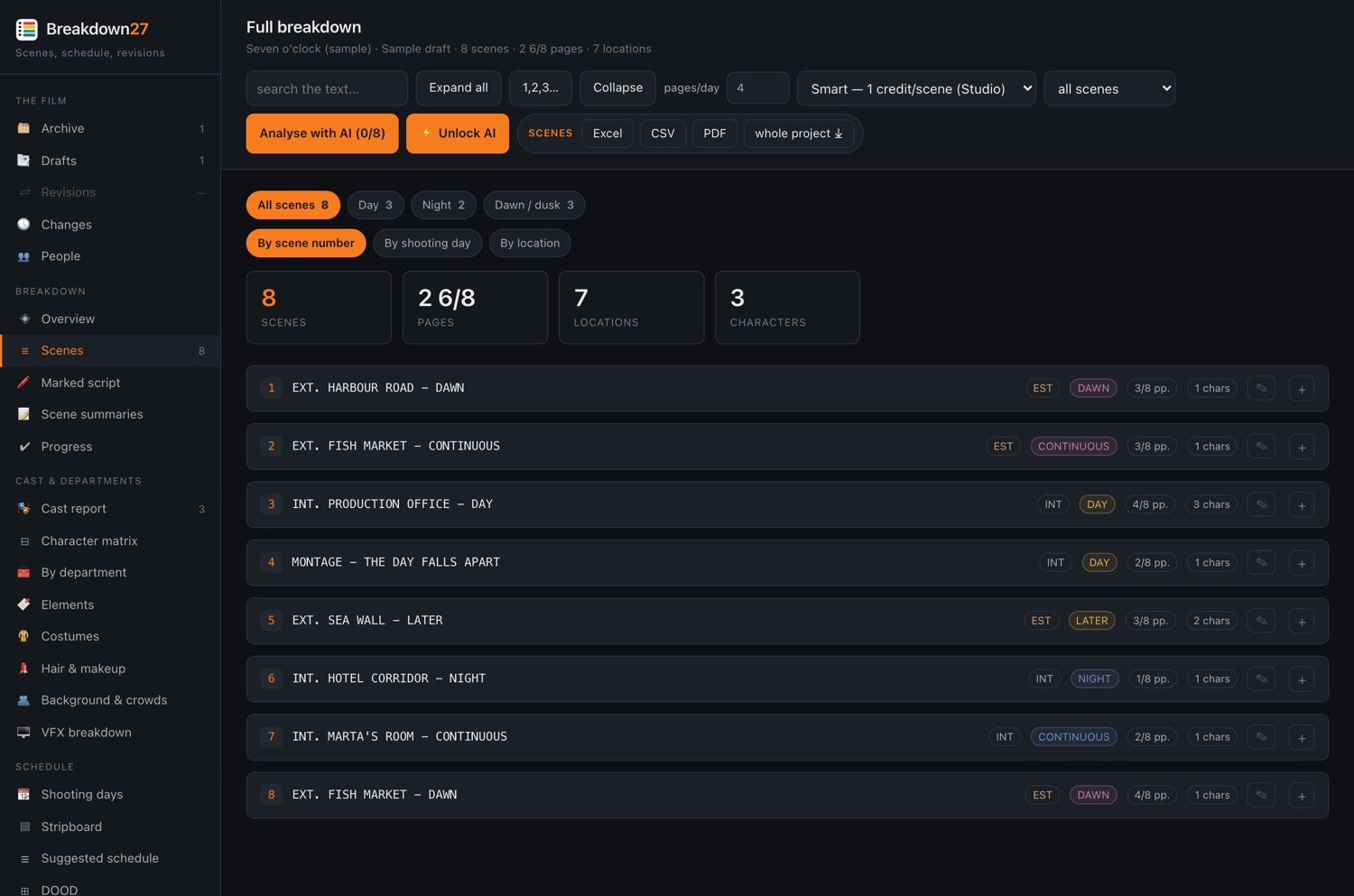
Before any AI, the app reads on its own: it splits the scenes, recognises the headings, works out interior or exterior and day or night, the location, who speaks, and measures every scene in eighths of a page — the unit a shooting day is measured in. It also flags the obvious markers: vehicles, weapons, animals, effects, stunts.
This is free and costs nothing to run.
The AI pass
Scenes → Analyse with AI
The AI reads each scene and fills the fourteen boxes on the sheet: props, set dressing, costumes, hair and makeup, background actors, vehicles, animals, weapons, special effects, visual effects, stunts, music and sound, camera equipment, production notes. Plus a one-line synopsis and a very short summary. It spends credits, and tells you the cost before it starts.
When you load a new draft, scenes that have not changed carry their sheet across. You do not pay twice to re-read what did not change: only the new material is analysed. Carried-over scenes are marked ↺ inherited.
The pages that read the breakdown
| Menu | What it gives you |
|---|---|
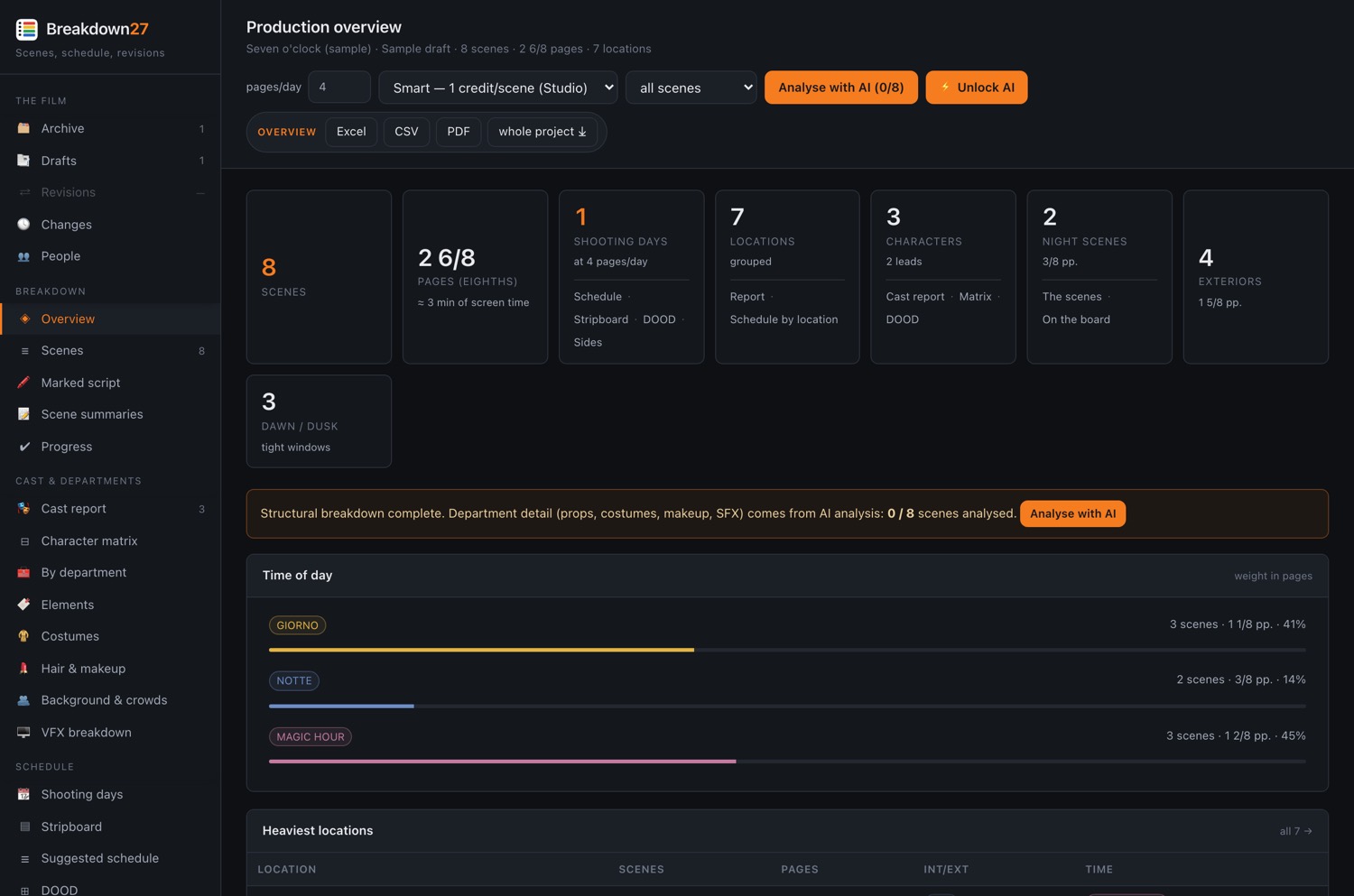
| Overview | The film on one screen, with the signals that drive the shoot: how many scenes with vehicles, with weapons, with effects, at night. |
| Scenes | The full breakdown with every department sheet. This is where you correct things. |
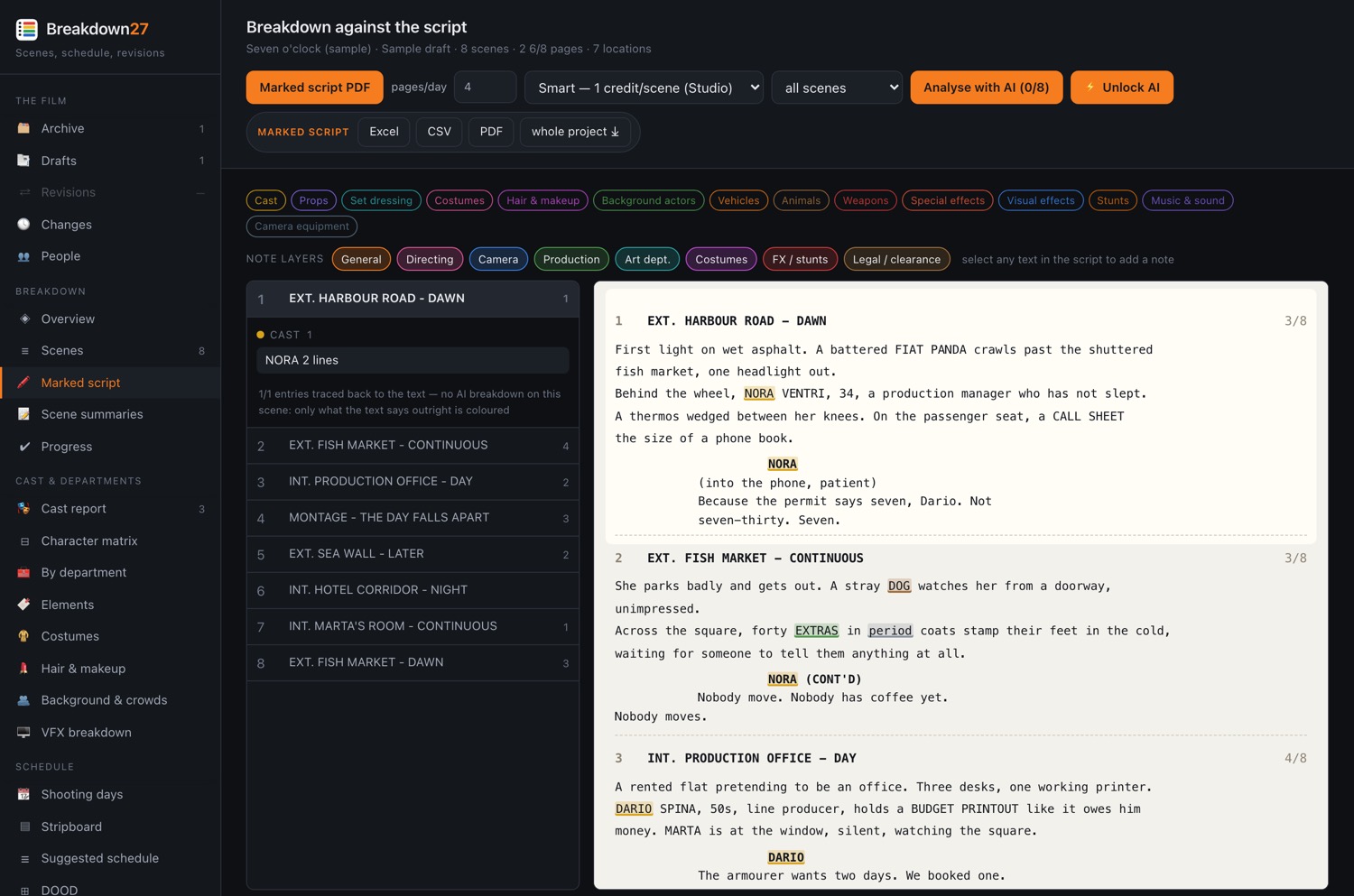
| Marked script | The whole script with breakdown entries highlighted in the text, coloured by department. It is the document the breakdown meeting runs on. |
| Scene summaries | Eight words a scene, for anyone who has to understand the film without re-reading it. |
| Progress | How much is still draft, how much in review, how much approved. |
Approving
On every scene, each department box has a state you advance by tapping it: draft → in review → approved. The scene header shows how many departments out of how many are approved.
It is not paperwork: it is how you know, from Progress, how far you are from a breakdown you can send out.
What the AI does
Two passes, and they are not the same thing. The first is a reader that runs on your machine, costs nothing and never asks permission. The second is the AI, which costs credits and does the work a person would otherwise do with a highlighter and three evenings.
The reader: what you get before spending anything
The moment a script is loaded, before any AI is involved, the app has already read it. This is not a teaser version — it is a working breakdown, and a lot of productions never need more than this.
| What it reads | How |
|---|---|
| Scene boundaries | Headings recognised and the script split scene by scene, numbers included — letter numbers too. |
| Interior / exterior | From the heading, with the abbreviations screenplays actually use. |
| Time of day | Day, night, dawn, dusk, continuous, later — and inherited down a run of CONTINUOUS when the heading does not repeat it. |
| Location | Pulled off the heading and grouped, so the same place across forty scenes is one location. |
| Who speaks | Character cues, cleaned of (V.O.), (O.S.), (CONT'D) and the rest. |
| Page length | Measured in eighths, the unit a shooting day is planned in. |
| Elements in capitals | Screenplay convention: a prop written REVOLVER in the action is picked up as an element, with how many times it appears. |
| Fourteen markers | Vehicles · Animals · Weapons · Special effects · Stunts · Visual effects · Water/underwater · Minors on set · Crowds · Music/playback · Period · Nudity/intimacy · Food styling · Special equipment — each flagged certain or likely, with the line that triggered it. |
You get the stripboard, the imported schedule, shooting days, DOOD, sides, the location report, the cast report and the character matrix. You get the on-set tool, WhatsApp, sun and moon, the change log and the whole crew on free seats. You get the exports.
What you do not get is the contents of the department sheets — and those you can also type yourself, one line at a time, on any scene. The app does not stop working without AI. It stops guessing.
The AI pass: what a reader cannot do
The markers say a scene has weapons. The AI says which weapon, whose, and what the armourer needs to know. That is the whole difference, and it is the difference between a flag and a breakdown sheet.
| The same scene | Reader alone | After the AI pass |
|---|---|---|
| Weapons | Weapons · likely | prop revolver — blanks, armourer required shoulder holster, period correct |
| Costumes | — | ELENA: blue coat — distressed, double needed MARCO: three-piece suit, 1974 cut |
| Background | Crowds · likely | bar patrons ×12 · waiter ×1 · street passers ×20 |
| What the scene is | the heading and the text | a one-line synopsis, and an eight-word summary for the reports |
| How hard it is | page count and markers | a complexity reading that weighs what is actually in the scene |
The fourteen boxes it fills
Props · Set dressing · Costumes · Hair & makeup · Background actors · Vehicles · Animals · Weapons · Special effects · Visual effects · Stunts · Music & sound · Camera equipment · Production notes. Each one a list of items with notes, in the same syntax you would type them in — so correcting the AI and writing it yourself are the same gesture.
The two passes that only exist with AI
| Pass | What comes out |
|---|---|
| VFX VFX breakdown |
A shot list, not a list of effects — vendors quote per shot. For each: type of work (set extension, cleanup, CG, crowd, comp), complexity band, what must be shot on the day (green screen, markers, clean plates, lidar) and the risks. It comes out as a bid package so quotes come back comparable. |
| Production note Production note |
The breakdown read as a whole: realistic day counts — minimum, realistic, comfortable, with the reasoning — risks with their department, impact and mitigation, and the questions worth putting to the director before anyone commits. |
What it costs, and how to spend little
The unit is a credit, and a credit is one scene:
| Depth | Cost | When |
|---|---|---|
| Smart | 1 credit a scene | The normal setting. Fills the sheets on the strength of what is written. |
| Deep | 3 credits a scene | For scripts where the detail is buried in the prose, or a sequence you need to get exactly right. |
Five ways to use less
- Start with a handful. The dropdown next to Analyse with AI runs the first 3, 6, 12 or 25 scenes instead of all of them. Three scenes is enough to see whether the sheets are worth what they cost on your script.
- It never re-reads what it has already read. A pass only touches scenes with no sheet yet, and skips the ones you excluded from reports. Running it twice does not charge twice.
- New drafts cost only what changed. Scenes that did not change carry their sheet across, marked ↺ inherited. A revision of six pages costs six pages.
- Type the ones you know. Every box is editable by hand. On a film you have already worked out, that can be faster than reading what a machine guessed.
- Set a ceiling. The app tells you the cost before it starts, and if credits run out it says so while you are working — your plan is fine, you need a top-up.
The AI never gets the last word, and never quietly changes something you wrote. It fills boxes; you approve them. Every field it produces can be rewritten — including the summary and the VFX shot list — without paying to run the pass again.
Which is why the states exist. A sheet the AI wrote is draft. It becomes approved when a person says so, and Progress counts how many are still waiting. On this app, an AI output is a proposal with a name on it — not a fact.
Fixing it by hand
The part that matters most. Everything the app generates can be changed, and changing it has to take seconds.
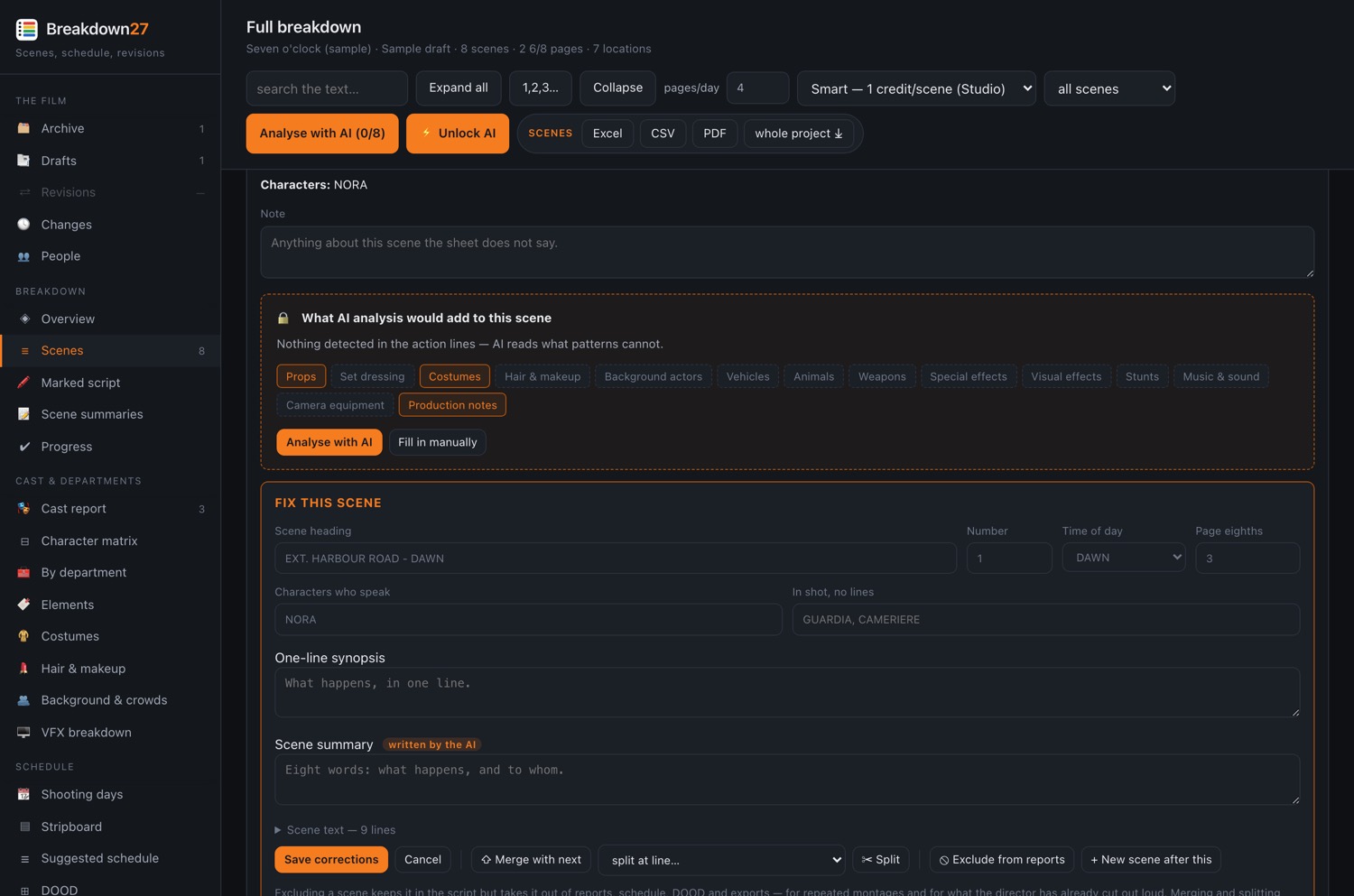
What you can change on a scene
| Field | Note |
|---|---|
| Scene heading | Interior/exterior, location and time of day are read off this. |
| Number | Takes letter numbers too: 12A. |
| Time of day | Only touched if you actually change it, so it does not overwrite what the new heading just said. |
| Page length | In eighths. Set it by hand and the app stops recalculating it. |
| Characters | Who speaks, and who is in shot without lines. |
| Synopsis | One line: what happens. |
| Summary | The eight words the AI wrote. Rewriting costs nothing. |
| VFX shots | One per line: 3× set extension — rooftop skyline | high | green screen | weather. Everything after the description is optional. Empty the box and the scene stops counting as VFX. |
| Scene text | Needed when the reader missed the scene: without text a scene is a shell. Rewrite it and characters and markers are recomputed. |
| Every department | One item per line, in the same syntax you read them in. |
Department syntax
- Plain items — prop gun — blanks, armourer required
- Costumes — ELENA: blue coat — distressed, double needed
- Hair & makeup — MARCO: cheekbone wound
- Background — bar patrons ×12
Adding a scene the reader missed
Tap the + on the scene before it, write the heading, and the app asks the question that matters:
OK — “2A”, a bis. Nothing else changes.
Cancel — “3”, and the 6 scenes after it move up by one.
This is not a matter of taste: it depends on where the film is. Once you are shooting, the numbers are already on call sheets, contracts and department sheets, so you add a bis — renumbering would mean two departments turning up on set with two different numbering systems. In prep, or when the app missed a scene, the numbering has to match the real script: you insert and the rest move up. The question tells you how many scenes would be renumbered, before it does it.
Letter numbers queue up correctly on their own: after 2A comes 2B, in the right order.
The other structural fixes
- Merge with the next scene — the second becomes action inside the first.
- Split at a chosen line, picked from a list.
- Exclude from reports — the scene stays in the script and in the page count but comes out of reports, schedule, DOOD and exports. For repeated montages and for what the director has already cut out loud.
- Renumber everything from one.
Every correction carries the name of whoever made it and when. The scene shows ✎ corrected, and hovering it lists them field by field. In the log the entry says exactly what changed — “Marco corrected scene 1 — page length, summary, VFX shots” — not a vague “corrected something”.
Cast and departments
The same breakdown, read for the people who have to use it instead of scene by scene.
| Menu | What it gives you |
|---|---|
| Cast report | Every character with their scenes, pages and days. This is what contracts get negotiated from. |
| Character matrix | Characters × scenes in a grid: you can see at a glance who can be shot together. |
| By department | Every department with its entries gathered from the whole film. |
| Elements | Every element once, with all the scenes it appears in. Rename them, merge duplicates and delete mistakes here: if the AI wrote “gun” in one scene and “revolver” in another, this is where they become one thing everywhere. |
| Costumes | Costumes character by character, in scene order: that is how continuity is built. |
| Hair & makeup | The same for hair and makeup. |
| Background & crowds | Background actors with quantities, day by day. |
| VFX breakdown | Shot by shot: type of work, complexity band, what has to be shot on the day (green screen, markers, clean plates, lidar) and the risks. The bid package for vendors comes out of here. |
Props · Set dressing · Costumes · Hair & makeup · Vehicles · Animals · Weapons · Special effects · Visual effects · Stunts · Music & sound · Camera equipment. Plus background actors and production notes.
The schedule
From the breakdown to shooting days, in the order that works.
- Load a schedule… — the shooting schedule is made in Movie Magic Scheduling, on the first AD's laptop, and that is where it should stay being made. Open the stripboard and load it: the printed PDF or the text export, either works. The scene numbers are matched to your breakdown, and the shooting dates come across with it.
- Stripboard — the board, where you move things by hand. One strip per scene, the colour telling interior from exterior and day from night. The board is banded by week and by day, with the date on each day, the way a printed schedule reads — weeks are counted from the Monday, so a shoot that starts on a Wednesday has a short first week and one that works the Saturday has a long one. A strip you have moved is outlined until you press Release schedule: that is when the change is announced to everyone on the film, so you can rework a whole day in peace and publish it once, the way a coloured revision goes out.
- Shooting days — the dates. Give the first day and the app fills in the rest, skipping public holidays. Change one date and the ones after it shift with it — and every one stays editable on its own.
- DOOD — Day Out of Days: who works which day, with calls, holds and drop/pickup.
- Sides — the day's pages, ready to print. For one actor too: their scenes and nothing else.
- By location — how many scenes, pages and days per location. This is how you decide what gets shot together.
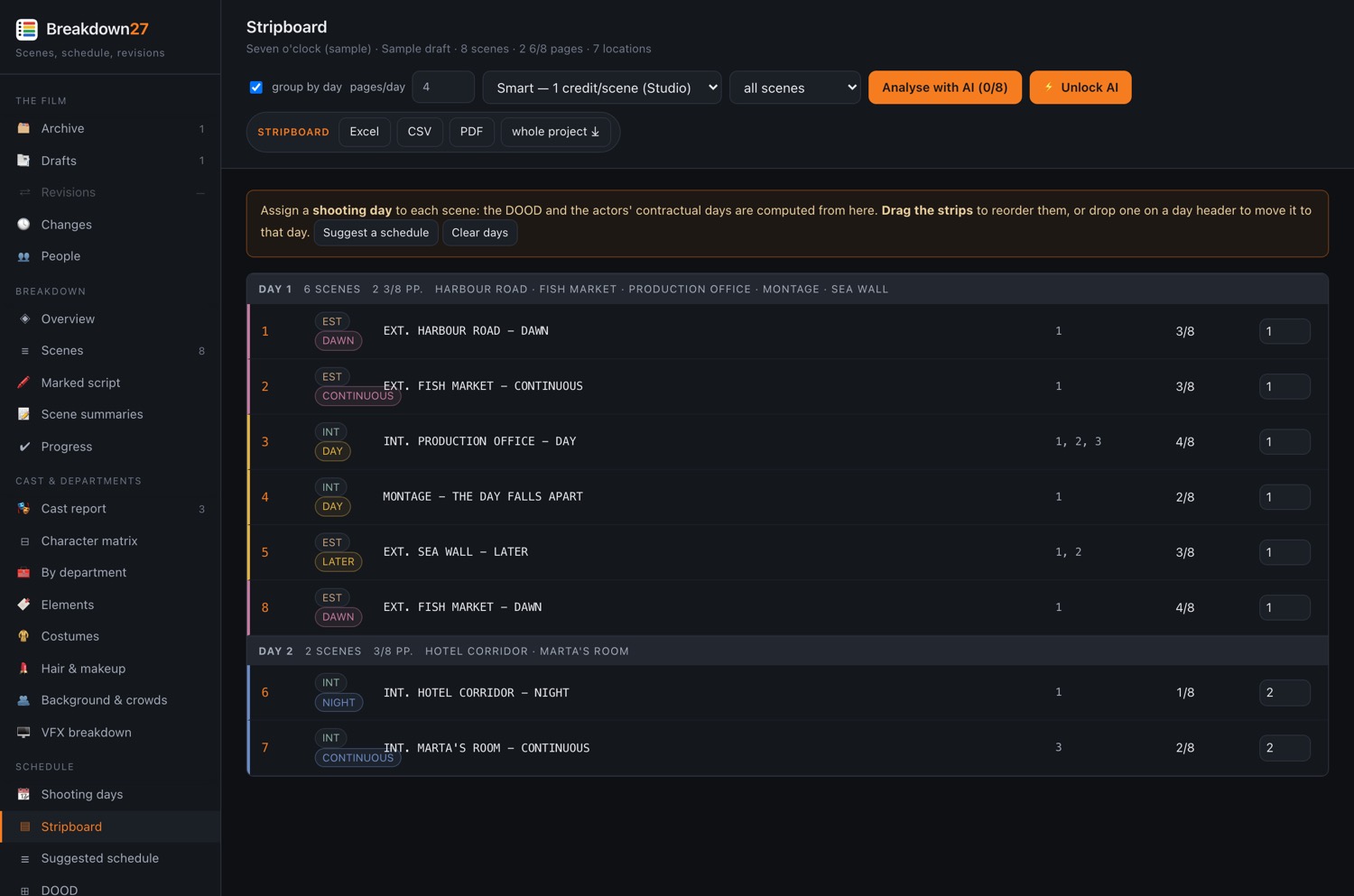
Dates are the frame around the schedule, not the other way round. Until scenes are on days, “day 5” is a number and not a date — which is why Shooting days stays switched off until the schedule exists, and says why.
Several entries stay off until they have something to work with, and hovering one says what is missing. It beats an empty page that explains nothing.
Revisions
Scripts change. The point is not having the latest version: it is knowing what changed and what that means for each department.
Loading a new draft
Drafts → Load a draft — drafts stack up inside the film, they do not replace each other. The old ones stay.
Comparing
Revisions — pick two drafts and the app tells you, scene by scene, what came in, what went out, what changed and what moved. Sheets on unchanged scenes carry across by themselves. From there you can re-analyse only the changed scenes, and produce a revision report to send round.
The comparison does not just say “scene 34 changed”. For your department it says what comes in, what goes out and what moves — because the props assistant's real question is not which scenes changed, it is what goes on the truck tomorrow morning.
The crew
Two kinds of seat, no administrator, and a log everyone reads.
| Full seat | Crew seat | |
|---|---|---|
| Cost | €12.99 a month | free, no limit on numbers |
| See everything | yes | yes |
| Write notes | yes | yes |
| Add photos | yes | yes |
| Send on WhatsApp | yes | yes |
| Correct the breakdown | all of it | their own department's lines |
| Mark scenes as shot | yes | no |
| Load drafts, keep the schedule, export, run the AI, invite | yes | no |
Volume discounts on full seats: −10% from 5, −20% from 10, −30% from 20.
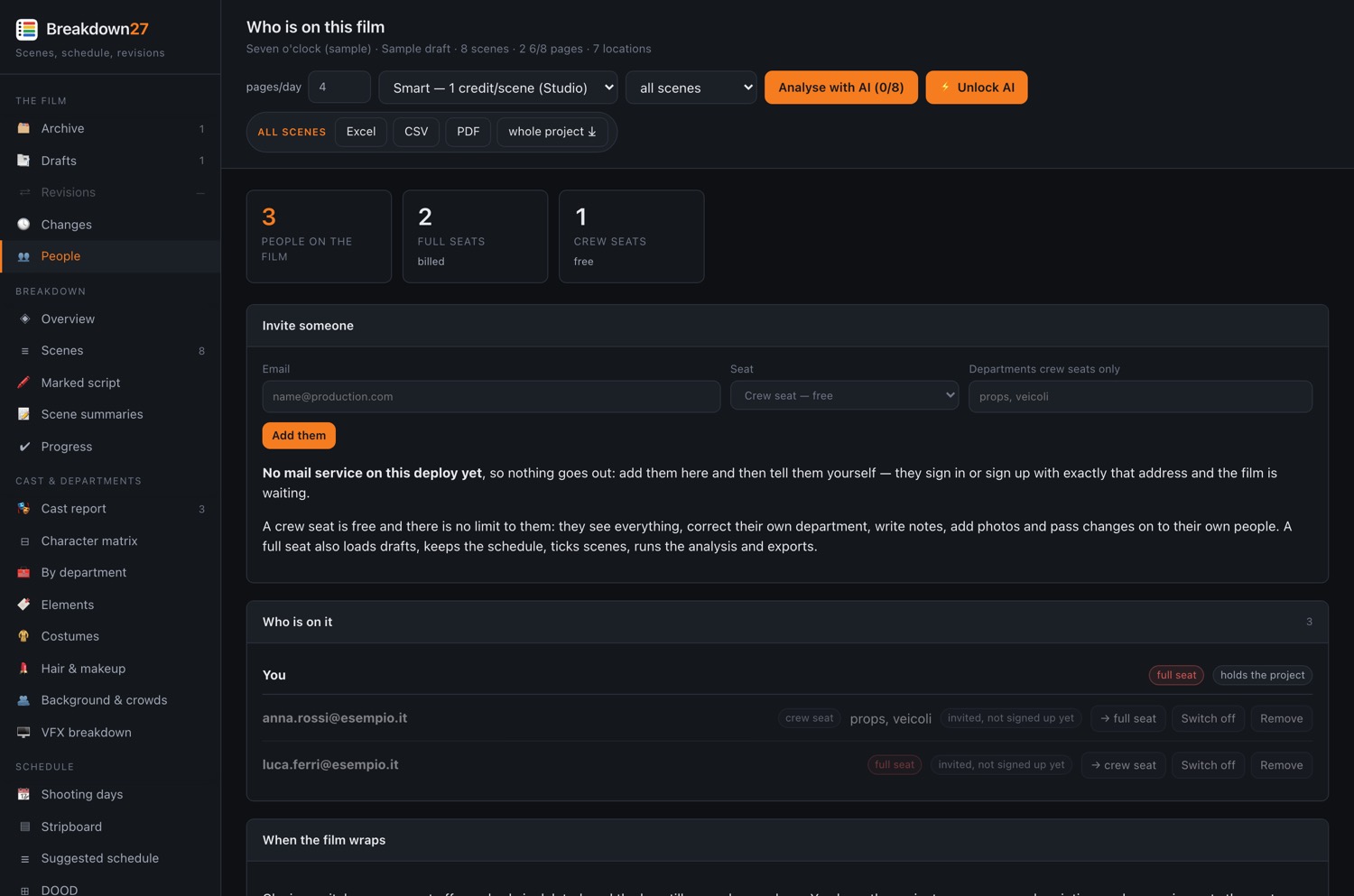
What you do from here
- Invite — address, seat type, departments. A letter goes out with a link that lands on the right form, with the address already filled in.
- Change a role — crew to full and back.
- Switch a seat off — they stop getting in and it stops being billed. Nothing is deleted, the log still says they were here, and switching it back on is one click.
- Close the film — when it wraps, every seat goes off at once. The project stays on the subscription of whoever holds it, and reopening brings everyone back without redoing a single invitation.
The only asymmetry is financial: whoever pays can delete the film and remove someone. On the work itself they can do nothing the other full seats cannot. Anyone with a full seat can invite whoever they want — but every invitation carries a name, and the log is read by everyone on the project. A log only one person can see is not a control, it is a private archive.
Telling people
Two mechanisms that are easy to confuse: the log takes everything, the notice wakes people up.
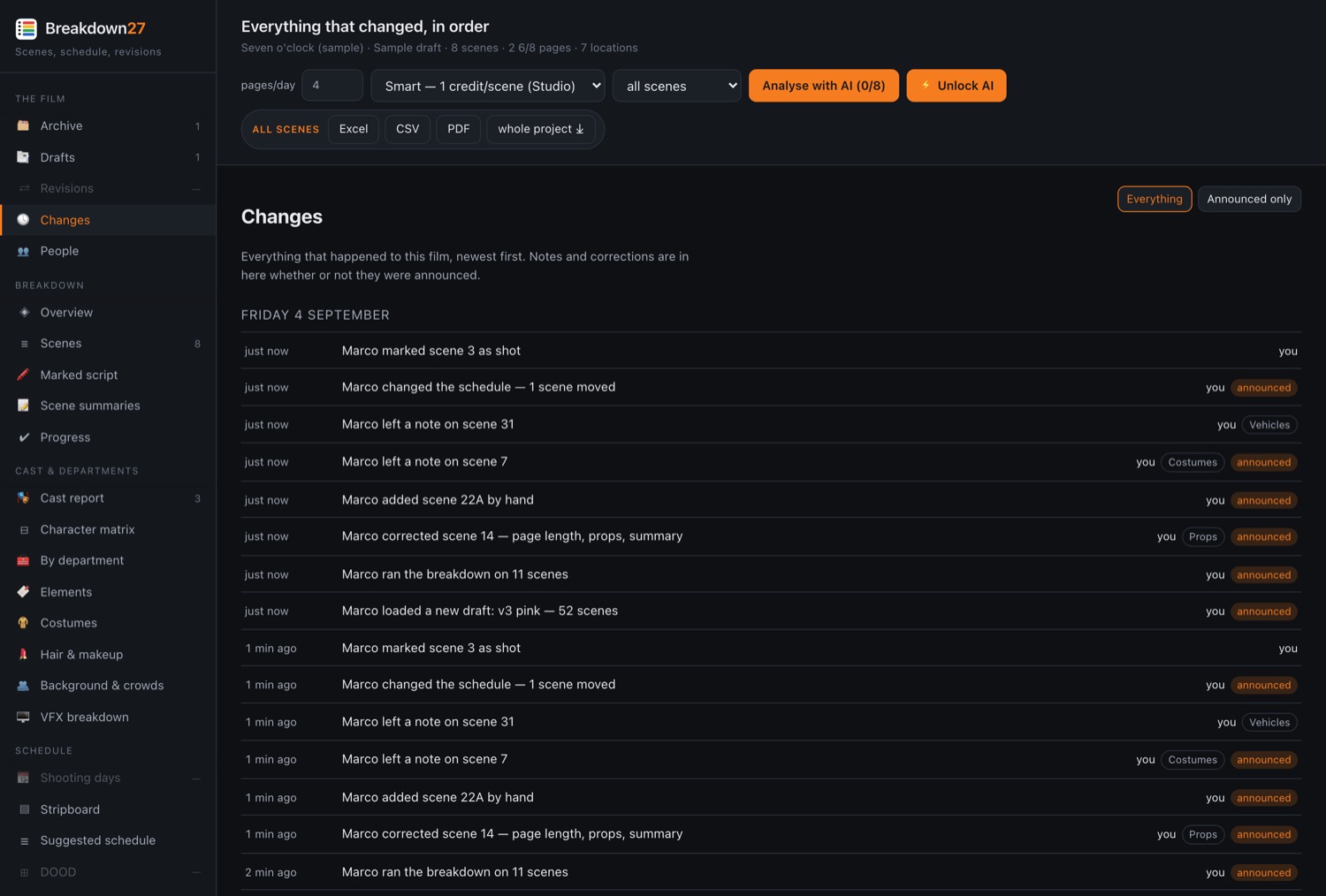
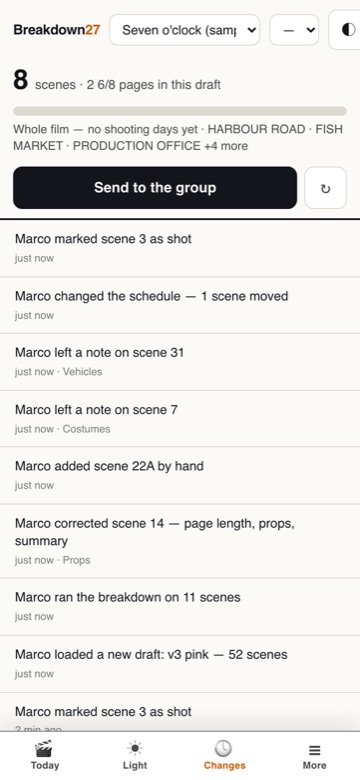
It is the same log on the phone, on its own screen with a badge for what you have not read. Not a cut-down copy: the same question — what happened while I was not looking — asked where the work is.
The log takes everything
Changes — every note, correction, draft, invitation, scene marked as shot: who, what, when, for which department. In sequence, split by day. What you have not read is highlighted and stays where it is in the sequence: moving it to the top would break the order, which is the whole point of the page.
The notice wakes people up
It appears as one line above the content — “2 changes on this film — Marco loaded a new draft: v2 blue” — with a button that takes you there. In the menu, Changes lights up in gold with the count.
| Announces itself | Asks first | Log only |
|---|---|---|
| a new draft an AI pass a scene added or removed a correction to the breakdown a renumbering |
a note a photo moving a scene in the schedule |
invitations and seats closing the film a scene marked as shot |
A new draft changes everyone's work: asking every time whether to announce it would only teach people to press “yes” without reading. A note often concerns one person, and a notice to the whole crew for every line written is the fastest way to get notices turned off. Marking a scene as shot happens twenty times a day.
A change that is not announced is not hidden: it is in the log, where anyone can read it. That is the difference between telling and recording, and you need both.
It arrives on its own
No reloading. The app asks the server every 25 seconds (30 on the set tool) whether anything changed, and asks only while the screen is on — a phone in a pocket has nothing to show, and the moment it comes back out it asks immediately. Your own changes are never announced to you.
On the set tool, Send to the group opens a list of what to send — you pick the parts, you do not send a block:
- The day — progress, light, scene list, department list, cast called, notes, locations.
- One scene — heading, cast, breakdown, notes, the scene as written.
- What changed — the news, and what it changes for your department.
Anyone on a free seat can send too, and can add their own notes. If you choose not to announce a change to everyone, it is still here for your own department.
Recces
On a recce the days do not lead you, the scenes do. And the question is always the same: what time is this light, and which way?
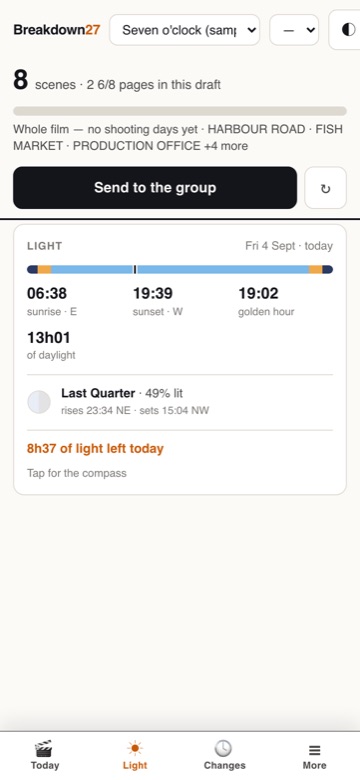
Light does not wait for shooting days. With no schedule at all it shows today, wherever you are standing — which is the recce case exactly: the days are not fixed yet and the question is what time the sun goes down here. The date and time can be moved by hand from the first second.
Sun and moon
Sunrise, sunset, golden hour, blue hour, azimuth, elevation. Moon phase with the drawing, moonrise and moonset. All worked out on the phone: it runs with no signal, and your position never leaves the device.
The two dials that matter
- Date — not just today: any shooting day, so you know what the light does on the day you will actually shoot.
- Time — scrub the time of day and the sun moves. This is how the DoP says “at this hour, from there”.
Compass and AR
The panel expands to full screen and becomes a compass: where the sun rises, where it sets, where it is now. From there you go to the AR view: raise the phone and the sun's path is drawn over what is in front of you.
If the phone's compass is off — it happens, near metal — you correct it by dragging, within ±30°, and the correction stays written on screen with a button to reset it.
The photo attached to a scene
You shoot from the AR view. The image comes out stamped with the date and time you set, not the moment you took it — because what needs documenting is the light on the shooting day, not on the recce. The photo attaches to a scene as a note, and shows up on both sides: phone and computer.
Finding the right scene
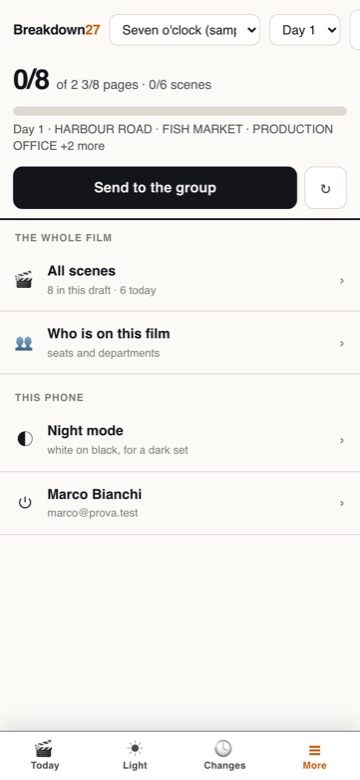
set → More → All scenes — every scene in the film, searchable by number, heading or character. Not just today's: on a recce you are looking at scene 48, which shoots on Thursday.
On set
breakdown27.com/set — a different tool, not a cut-down version. One hand, ten seconds at a time, and often no signal.
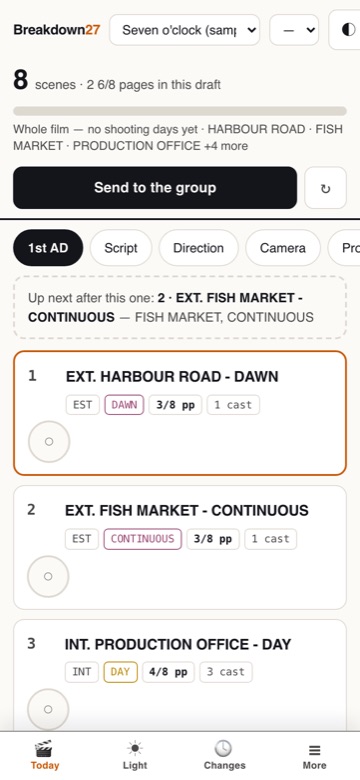
Add the page to your home screen: it opens as an app of its own. Nobody on a set goes looking for a bookmark inside a browser.
The four screens
The bar sits at the bottom because that is where your thumb reaches.
| Screen | What is on it |
|---|---|
| Today | The day: progress in eighths, what is up next, your department's kit list, the scenes to tick off. |
| Light | Sun and moon, compass, AR. |
| Changes | The change log, with a badge for what you have not read. |
| More | Every scene with search, who is on the film, night mode, your account. |
Your role
You pick who you are at the top: 1st AD · Script · Direction · Camera · Props & set · Costume & make-up · Crowd · FX & stunts.
The role decides the kit list: what has to be on the truck today, gathered from the day's scenes for the departments that concern you.
The day's gestures
- Tick a scene off as shot — the page count updates immediately.
- Write a note on a scene.
- Move a scene to another day, or take it out of the schedule.
- Reorder today.
- Attach a photo to a scene.
- Send to the group on WhatsApp, choosing what.
- Night mode — white on black, for a dark set.
What changed while you were away
While you were away appears at the top when there is something to say. Two different sources in the same box, because for the reader it is one question:
- what changed in the scenes of your day — from comparing the copy on the phone with the one on the server;
- what people did — from the log.
From there it goes to your own department on WhatsApp in one tap.
Everything you do stays on this phone and goes up by itself when the line comes back: scenes ticked off, notes, moves, and the log entries too. A day shot in a basement still leaves a trace.
When the connection returns, the gestures made offline are replayed on top of whatever the server says — otherwise a refresh would make scenes you already ticked off come back unticked, and somebody would tick them again.
Getting the work out
Export centre — the panel that says, sheet by sheet, what has something to say and what is still empty. And why.
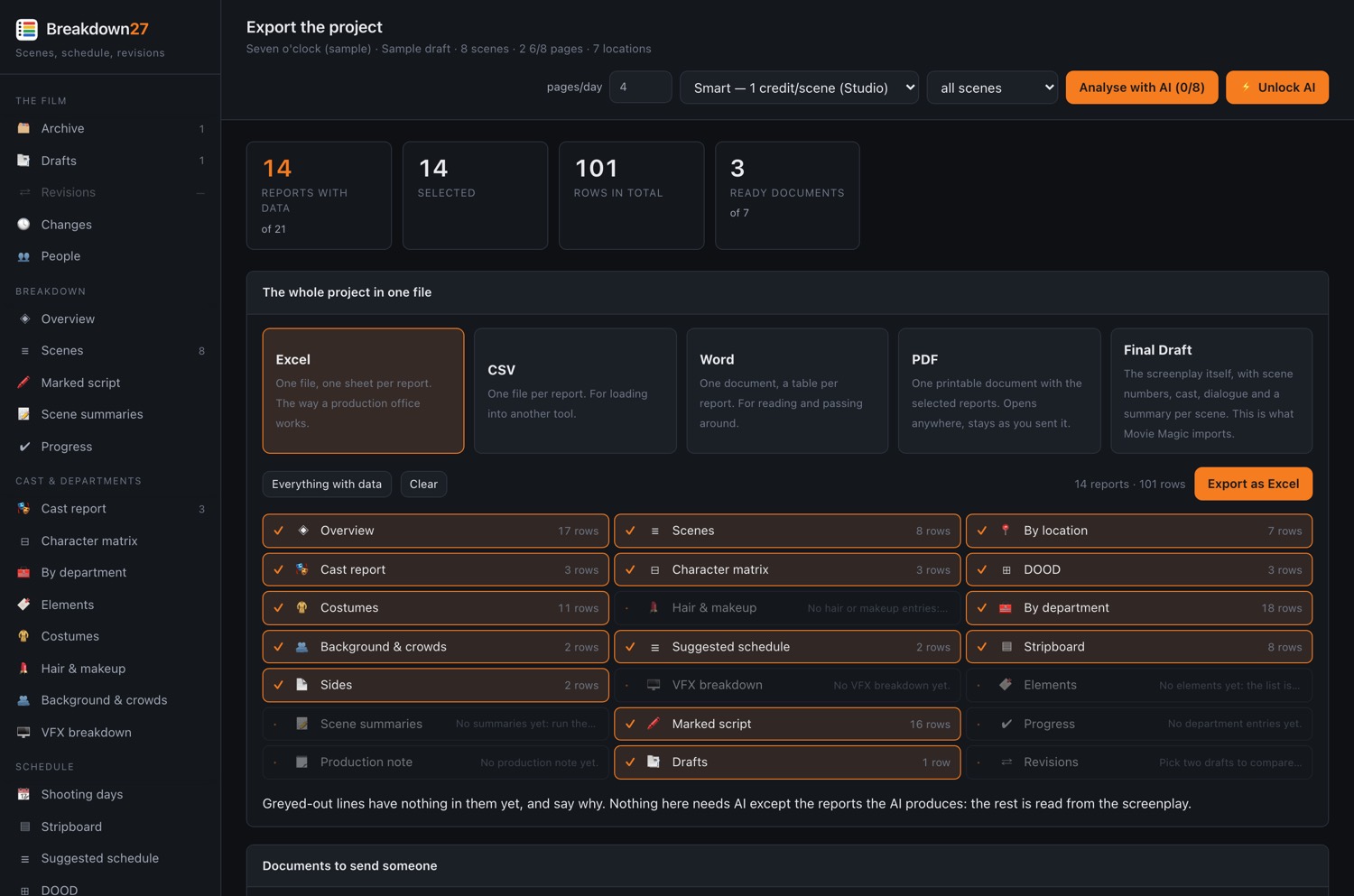
| Format | What for |
|---|---|
| Final Draft .fdx | What the scheduling suites import. |
| Movie Magic .mms | With the field names Movie Magic expects. |
| Excel and CSV | The sheet for the view you are on, or everything at once. There is also one sheet per department head. |
| Word | The scene summaries. |
| Calendar .ics | The shooting days in the phone's calendar. |
| Of the view you are on; the marked script with department colours and notes; the sides for a day or for one actor. | |
| VFX bid package | The document you send vendors so the quotes come back comparable. |
The production note
Production note — the AI reads the breakdown as a whole and writes: realistic day counts (minimum, realistic, comfortable, with the reasoning), risks with department, impact and mitigation, and the questions to put to the director. It copies as three lines to paste into an email, or comes out as a document.
Account and admin
The things you look at once every six months, and still have to be able to find.
My account
- Your profile — name and address can be corrected.
- Change password — needs the old one.
- Plan and billing — see the plan, change it (Change plan), buy AI credit, open the billing portal, cancel or restart.
- Download your data — everything about you in one file, in a format that reads back. That is a right, not a courtesy.
- Delete your account — it asks you to retype your address to confirm. Films you hold go with it; films where you are only a guest you simply come off, and they are untouched.
Sign out
Last entry in the menu, always visible. On the set tool it is in More → your name.
AI spend
Visible in personal mode only: cost per token, a monthly ceiling, and the commands to block, unblock or reset the spend.
The AI pass spends credits. The app tells you the cost before it starts, and if credits run out it says so while you are working instead of sending you to look at subscriptions: your plan is fine, you need a top-up.
Every menu
The complete map of the sidebar, in the order you find it.
| Group | Entry | In one line |
|---|---|---|
| The film | Archive | Your films |
| Drafts | The drafts of this film | |
| Revisions | Comparison between two drafts | |
| Changes | Everything that happened, in order | |
| People | Who is on the film, and invitations | |
| Breakdown | Overview | The film on one screen |
| Scenes | The full breakdown — corrections happen here | |
| Marked script | The script with the breakdown highlighted | |
| Scene summaries | Eight words a scene | |
| Progress | How much has been approved | |
| Cast & departments | Cast report | Every character, scenes and days |
| Character matrix | Characters × scenes | |
| By department | Every department | |
| Elements | Every element once — rename and merge | |
| Costumes | Costume continuity | |
| Hair & makeup | Hair and makeup | |
| Background & crowds | Background with quantities | |
| VFX breakdown | Shot by shot, and the bid package | |
| Schedule | Shooting days | The dates, which shift as a chain |
| Stripboard | The board, moved by hand | |
| DOOD | Day Out of Days | |
| Sides | The day's pages | |
| By location | Scenes, pages and days per location | |
| On set (phone) | Opens the set tool | |
| Deliverables | Production note | Realistic days, risks, questions for the director |
| Export centre | Every format, and what is ready | |
| Account | My account | Profile, plan, billing, data |
| Manual | This page | |
| AI spend | Spend control (personal mode) | |
| Sign out | Sign out |
The set tool
| Screen | Inside |
|---|---|
| Today | Role · progress · what is next · kit list · scenes to tick off · Send to the group |
| Light | Sun · moon · compass · AR · photo attached to a scene |
| Changes | The log, with the unread badge |
| More | All scenes with search · who is on the film · night mode · account and sign out |